Is Squarespace Good for Selling in 2026?
So you're thinking about starting an online store, and you've heard Squarespace makes it easy. But is Squarespace good for selling? The short answer is: it depends on what you're selling and how you plan to grow.
The good thing about Squarespace is that it lets you sell unlimited products with flexible shipping features and simple payment processing. It’s very user-friendly; anyone can start an online store easily.
The platform comes with a huge library of beautiful templates and an easy setup process. In addition to that, you can use Squarespace blueprint AI to generate your AI template and save time.
However, it has limitations with international selling, shipping calculations outside the US, and payment processor options.
In this article, I’ll explain everything you need to know about selling on Squarespace. You’ll learn what the platform does well, where it falls short, and how it fits different business goals. By the end, you’ll have a clear idea of whether Squarespace is the right platform for your online store.
Is Squarespace Good for Selling?
Based on my experience with the platform, Squarespace is still a strong choice for selling in 2026. It’s a great option, especially for small businesses, creatives, and beginners who want an easy-to-use platform.

It continues to offer clean templates, built-in ecommerce tools, and simple product management. This makes it great for people who want to launch a store without dealing with a complicated setup.
Moreover, Squarespace also keeps improving its features each year. In 2026, users will benefit from better checkout options, faster site performance, and more marketing tools like email campaigns and analytics. These updates help sellers create a professional shopping experience.
However, it’s important to know that Squarespace has limits. It’s not ideal for very large stores with hundreds of products, advanced inventory needs, or complex shipping setups. Platforms like Shopify or WooCommerce handle those situations better.
Overall, Squarespace is a good platform for selling if you want something simple, beautiful, and reliable. It works best for small to medium-sized shops, service providers, and creators who value design and ease of use.
I recommend that you take Squarespace for a test with a free 14-day trial. You can create your store, upload products, and explore the templates risk-free. See for yourself if the platform matches your needs. Use code MEHDI10 for 10% off if you decide to go with Squarespace.
What Can You Sell on Squarespace?
Squarespace allows you to sell many types of products, which makes it flexible for different kinds of businesses. You can sell physical products, like clothing, beauty items, or handmade goods.
You can also sell digital products, such as ebooks, presets, guides, templates, or downloadable files. I have written a previous blog post about how to sell digital products on Squarespace. You can check it out if you want to learn more.
If you offer services, Squarespace supports those, too. You can sell appointments, consultations, classes, or coaching sessions using the built-in scheduling tools.
Keep in mind that creators can also sell memberships, subscriptions, and exclusive content, giving you more ways to earn money.
Overall, Squarespace makes it easy to sell almost anything on your website. As long as your business doesn’t need very advanced ecommerce features. It’s a reliable platform for many types of products and services.
Squarespace Ecommerce Pricing for Sellers
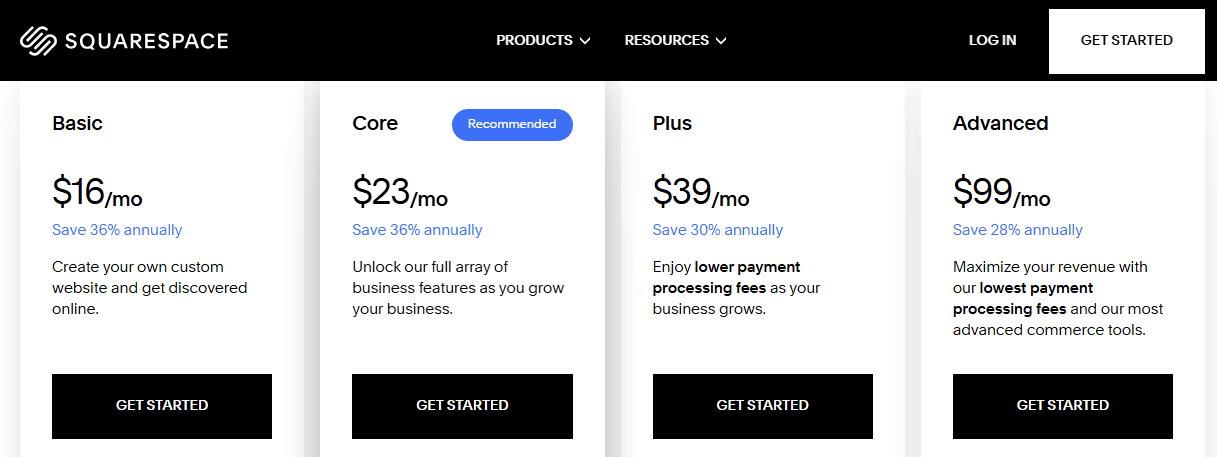
Squarespace has four main pricing plans in 2025. Each plan works for different business sizes, so it’s important to understand what you get before choosing.
1. Squarespace Basic Plan
The Basic plan starts at $16 per month annually or $25 per month(monthly). It includes a 2% transaction fee on every sale. You also pay the standard credit card rate, which starts at 2.9% + $0.30.
This plan is good for small sellers or anyone building a simple website with up to two contributors. It’s affordable, but the fees increase as you make more sales.
2. Squarespace Core Plan
The Core plan starts at $23 per month annually or $36 per month(monthly). It removes all transaction fees for physical products. You still pay the credit card rate of 2.9% + $0.30. Digital memberships have a 5% fee.
This plan gives you unlimited contributors and more advanced tools. Because of this, it works best for most growing businesses.
3. Squarespace Plus Plan
The Plus plan starts at $39 per month annually or $56 per month(monthly). It lowers your credit card rate to 2.7% + $0.30. It also reduces digital content fees to 1%.
You get professional shipping tools, sales funnel analytics, and API integrations. This plan is a great choice if you want to scale and save money on fees.
4. Squarespace Advanced Plan
The Advanced plan starts at $99 per month annually or $139 if you want to pay monthly. It offers the lowest credit card rates and no transaction fees.
It also includes the most advanced ecommerce features. This plan is ideal for established brands that want more control, automation, and the best possible rates.
Key Takeaways
Starting from the Core plan, Squarespace removes transaction fees for physical products.
Digital products and memberships have separate fees that go from 7% in Basic to 1% in Plus.
All plans include professional templates, analytics, email marketing tools, and AI features to help you build your store.
If you are just starting, the Basic plan is enough.
If you want steady growth, the Core plan is the best choice.
If you are scaling, the Plus plan helps reduce costs.
If you are an established brand, the Advanced plan gives you the most value.
Pros of Selling on Squarespace
Selling on Squarespace has many advantages, especially if you want a simple and professional online store. Here are the main benefits in clear and easy-to-read points:
Easy to use: You can build your store with simple drag-and-drop tools. No coding skills needed.
Beautiful templates: Squarespace offers clean and modern designs that make your store look professional right away.
All-in-one platform: You get hosting, ecommerce tools, design features, and analytics in one place. You don’t need extra apps to start.
Simple product management: It’s easy to add products, update prices, track inventory, and manage orders.
Built-in marketing tools: You can use email campaigns, SEO tools, and social media integrations without paying for extra plugins.
Mobile-friendly designs: All templates work well on phones and tablets, which helps you reach more shoppers.
Secure and reliable: Squarespace handles hosting, security, and updates, so your store stays fast and safe.
Clear pricing: The pricing is straightforward, which makes it easier to control your costs.
So in conclusion, Squarespace works well when you need a straightforward platform that looks professional and won't let you down.
Cons of Selling on Squarespace
Squarespace is a great platform, but it also has some drawbacks you should know before starting. Here are the main downsides explained in simple language:
Not ideal for large inventory: If you sell hundreds of products or have complex variations, managing everything can feel slow or limited.
Fewer integrations compared to Shopify: Squarespace doesn’t offer as many third-party apps or plugins, which can limit customization. However, Squarespace still has a good library of extensions and plugins you can use. For example, you have plugins like Syncee and Spocket that are great for dropshipping on Squarespace.
Basic shipping options on lower plans: You need a higher plan to unlock professional shipping tools and more advanced delivery settings.
Transaction fees on the Basic plan: If you choose the Basic plan, you’ll pay a 2% transaction fee on every sale, which can add up over time.
In conclusion, Squarespace is easy to use, but it may feel limiting if you want advanced features or plan to scale a very large store.
Squarespace vs Shopify
Squarespace and Shopify are both popular ecommerce platforms, but they serve different needs. Squarespace focuses on design and simplicity, while Shopify prioritizes selling power and scalability.
Design and Setup
Squarespace offers superior templates with professional design quality. The drag-and-drop editor is intuitive, and you can launch a store in hours without coding. Shopify provides more basic themes but allows deeper customization if you have technical skills or hire a developer.
Selling Features
Shopify dominates in ecommerce functionality. It supports multiple currencies, offers carrier-calculated shipping worldwide, and handles complex inventory management.
Squarespace covers the basics well but struggles with international selling. It displays only one currency until checkout and limits carrier-calculated shipping to the US.
Apps and Integrations
Shopify has over 8,000 apps for adding features, though most stores spend $50-$200 monthly on them. On the other hand, Squarespace offers fewer integrations but includes essential tools like email marketing and analytics in the base price.
Pricing
Squarespace starts at $16/month (with 2% transaction fees). Shopify begins at $39 per month but requires app purchases to match Squarespace's built-in features. Both platforms cost roughly the same for small stores.
Which One to Choose?
Choose Squarespace if you're a small business selling mainly to US customers and you value beautiful design. Choose Shopify if you're building a serious ecommerce business, selling internationally, or planning significant growth. Squarespace wins on aesthetics and simplicity. Shopify wins on functionality and scale.
Use Squarespace if you:
Sell primarily to US customers.
Run a small to medium-sized business.
Value design over advanced features.
Want an all-in-one solution.
Use Shopify if you:
Sell internationally.
Plan to scale significantly.
Need advanced ecommerce features.
Require specialized apps and integrations.
Real Reviews of Selling on Squarespace
Real seller experiences show both strengths and limitations. Here's what business owners actually say about the platform.
What Sellers Praise
Sellers love the professional design quality and quick setup process. Many report launching stores in a weekend without technical help. Small business owners mention that customers frequently compliment their websites, which builds credibility and trust.
The all-in-one approach gets positive feedback. Sellers appreciate not juggling multiple subscriptions for hosting, email marketing, and analytics. One consistent compliment is the mobile shopping experience. All Squarespace stores look great on phones without extra work.
I always recommend that you start the free trial on Squarespace to have a look at all the features for yourself. Don’t always listen to what others say becauseit might work perfectly for you.
Common Frustrations
International selling creates the most complaints. Sellers outside the US struggle with limited shipping options and currency display issues. Several reviews mention losing international customers confused by checkout currency conversions.
Payment processor limitations frustrate some sellers. Being restricted to Stripe and PayPal means lost sales from customers preferring other payment methods.
Growing businesses complain about basic features. Sellers mention weak inventory management, limited reporting tools, and difficulty managing complex product variations.
Template switching causes problems. Multiple sellers warn about difficulty changing templates after launch, often losing customizations in the process.
The Bottom Line
Positive reviews come mainly from small businesses selling domestically with simple product catalogs. These sellers appreciate the design-functionality balance. Negative reviews typically come from businesses scaling internationally or needing advanced features. Squarespace works well until you outgrow it, then migration becomes necessary.
Conclusion
Squarespace can be a solid choice for selling online in 2026. Especially if you run a small to medium-sized store with straightforward products and mostly local customers. It offers beautiful templates, easy setup, secure checkout, and basic marketing tools, making it beginner-friendly.
However, it has limitations for international sales, advanced e-commerce features, and automatic traffic generation.
If your focus is a simple, visually appealing store and you’re willing to handle marketing and sales yourself, Squarespace can work well. But if you plan to sell globally, need multiple currencies, or want more advanced e-commerce features, platforms like Shopify or WooCommerce might be better.
So stop wondering and start building. Squarespace offers a 14-day free trial with full access to all features. You can create your store today and see firsthand if this platform can help you sell online successfully. You can use my code MEHDI10 for 10% off and a free domain name for the first year after your trial.
Ultimately, Squarespace is best for sellers who value ease of use and design, while understanding that growth and sales depend on effort, strategy, and marketing.
Frequently Asked Questions
Can you make money selling on Squarespace?
Yes. Many people make money selling on Squarespace. It works well for small and medium-sized online stores with simple products. Your success depends mostly on your products, marketing, and customer service. All paid Squarespace plans let you sell unlimited products. You also get nice templates, secure checkout, and basic marketing tools.
Does Squarespace take a percentage of sales?
It depends on your plan. The Basic plan charges a 2% fee on each sale. The Core, Plus, and Advanced plans have no Squarespace transaction fees for physical products. You will still pay normal credit card processing fees (about 2.9% + 30¢ per order) through Stripe or PayPal. For digital products and memberships, the Basic plan charges a 7% fee, which goes down on higher plans.
Can I migrate from Squarespace to Shopify later?
Yes, but it takes some work. You can export your products and customer data from Squarespace, but you’ll need to rebuild the design on Shopify because templates don’t transfer. There are apps and services that help with migration, but expect to spend some time or money to get everything set up.
Is Squarespace good for selling internationally?
Not really. Squarespace only lets you sell in one currency, and its multilingual features are limited. International customers may get confused because they see only one currency until checkout. You also can’t use carrier-calculated shipping outside the US, and taxes like VAT need manual setup.
What payment methods does Squarespace accept?
Squarespace accepts payments through Stripe and PayPal only. This includes major credit cards, debit cards, and PayPal accounts. You can’t add other payment systems like Square, Amazon Pay, or local payment providers. For US sellers, this is usually enough, but it may be limiting for international stores.
Related Blog Posts: